San Andreas / Skinler / Diğer Skinler ve Skin Paketleri
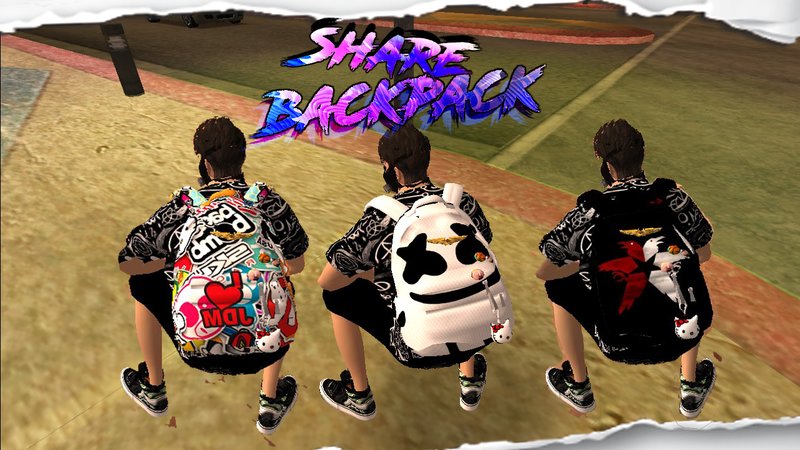
Share Backpack
- Ceervo | yükleyen: Ceervo
- 10/11/2020
- 14240 İndirme
Puanlamalar:
Lütfen önce giriş yap.
Favoriler:
Videolar
Henüz hiç video eklenmedi.Bu moda video eklemek için giriş yapmış olman gerekir.
Açıklama
In the amod achive there is a .psd file for you if you want to create your own backpack desings
they overwrite the necklaces so, if you want to add more desings, just check this site and you will know what to do
https://wiki.multitheftauto.com/wiki/CJ_Clothes
hope you all like it.
they overwrite the necklaces so, if you want to add more desings, just check this site and you will know what to do
https://wiki.multitheftauto.com/wiki/CJ_Clothes
hope you all like it.
Yorumlar
Şu ana kadar 12 yorum gönderilmiş.

01/03/2024 19:29
@widya2404 Thanks for reporting this, i never used them with a hoddie so i didn't really cared.
The DFFs are the same model copied a bunch of times, just re-name it and it will work
Alıntı yap | Cevapla | (0)
@widya2404 Thanks for reporting this, i never used them with a hoddie so i didn't really cared.
The DFFs are the same model copied a bunch of times, just re-name it and it will work
Alıntı yap | Cevapla | (0)

01/03/2024 00:24
The name of all neck hoddy file is wrong, it should be neck_hoodya & neck2_hoodya. can you fix it?
Alıntı yap | Cevapla | (0)
The name of all neck hoddy file is wrong, it should be neck_hoodya & neck2_hoodya. can you fix it?
Alıntı yap | Cevapla | (0)

04/10/2023 06:41
@CeervoCan you convert the image format to txd or jpg that won't open on the phone
Alıntı yap | Cevapla | (0)
@CeervoCan you convert the image format to txd or jpg that won't open on the phone
Alıntı yap | Cevapla | (0)
10/16/2020 19:24
@Blade Modding you would have to download 3ds max, activate it, install kams script, import the backpack model, import the torso from de female player, move it, scale it, to fit perfectly, and export it and append in the new model, i took a hole year just by my self, leaning how to create clothes, accessories, skins and objects, and if i dont look friendly is for seeing comments of peoples that just want everything in teir hands without any effort of searching or think
Alıntı yap | Cevapla | (1)
@Blade Modding you would have to download 3ds max, activate it, install kams script, import the backpack model, import the torso from de female player, move it, scale it, to fit perfectly, and export it and append in the new model, i took a hole year just by my self, leaning how to create clothes, accessories, skins and objects, and if i dont look friendly is for seeing comments of peoples that just want everything in teir hands without any effort of searching or think
Alıntı yap | Cevapla | (1)
10/16/2020 03:29
@Ceervo oh lol dont think me that stupid lol. I was asking how can I fit it perfect for my character i will take guide from someone else u don't lokk friendly
Alıntı yap | Cevapla | (0)
@Ceervo oh lol dont think me that stupid lol. I was asking how can I fit it perfect for my character i will take guide from someone else u don't lokk friendly
Alıntı yap | Cevapla | (0)
10/15/2020 20:43
@Blade Modding just but it on your modloader folder(?) and delete the necklaces folder on the APFR (?) wtf dude im not a teacher thats basic logic think for a second omg...
Alıntı yap | Cevapla | (0)
@Blade Modding just but it on your modloader folder(?) and delete the necklaces folder on the APFR (?) wtf dude im not a teacher thats basic logic think for a second omg...
Alıntı yap | Cevapla | (0)
10/15/2020 13:14
@Blade Modding it suport any p.img, i just dont know if it will fit correctly try it for your self bro, and thank you

Alıntı yap | Cevapla | (0)
@Blade Modding it suport any p.img, i just dont know if it will fit correctly try it for your self bro, and thank you
Alıntı yap | Cevapla | (0)


 10/10
10/12/2020 02:44
Loved it ???? . Does it supports APFR( Amazing Player Female Remastered)
Alıntı yap | Cevapla | (1)
Loved it ???? . Does it supports APFR( Amazing Player Female Remastered)
Alıntı yap | Cevapla | (1)