San Andreas / Modlar / CLEO Modifikasyonları
Kingdom Hearts 2 - HUD Style (Add-on GTA V) Beta 01
- nagi_sanzenin,DK22pac | yükleyen: Nagi_Sanzenin
- doamariere4.blogspot.com/
- 09/18/2015
- 6195 İndirmeler
Puanlamalar:
Lütfen önce giriş yap.
Favoriler:
Videos
Henüz hiç video eklenmedi.Bu moda video eklemek için giriş yapmış olman gerekir.
Açıklama
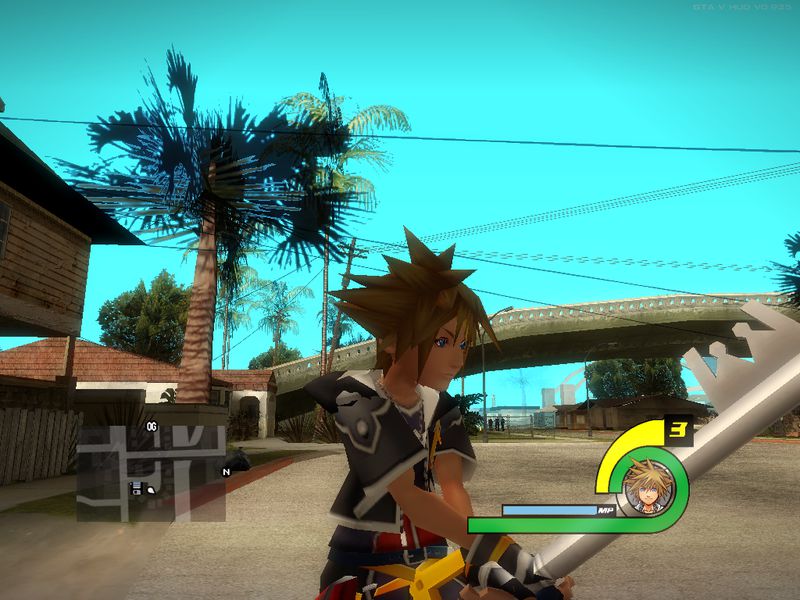
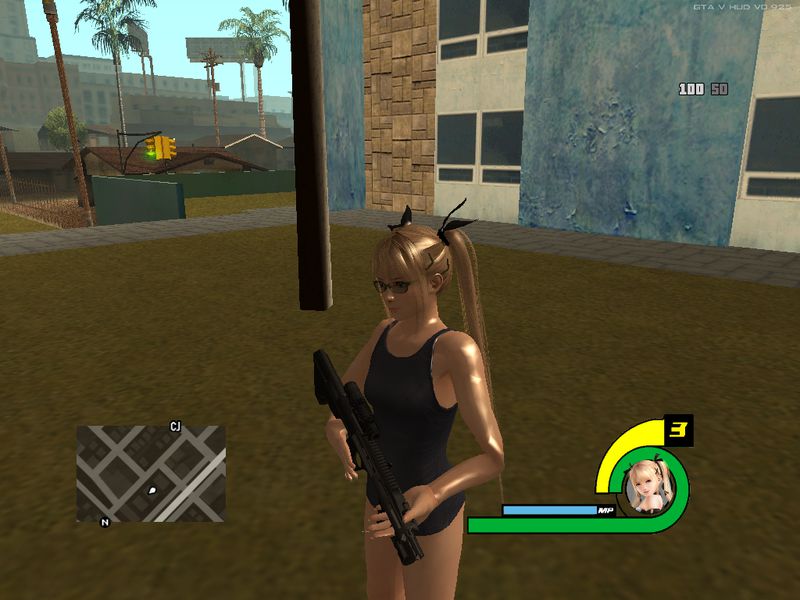
HUD from Kingdom Hearts Series.
- 100% Health Working with HUD
- 100% Armor working with HUD
- Selectable Characters
-sora
-riku
-marie rose
-lightning
-roxas
-date masamune
-yukimura
- Works with SAMP.
You need the Original GTA V HUD by Dk22pac in order to use this.
http://gtaforums.com/topic/652697-gta5-hud-by-dk22pac/
- 100% Health Working with HUD
- 100% Armor working with HUD
- Selectable Characters
-sora
-riku
-marie rose
-lightning
-roxas
-date masamune
-yukimura
- Works with SAMP.
You need the Original GTA V HUD by Dk22pac in order to use this.
http://gtaforums.com/topic/652697-gta5-hud-by-dk22pac/
Yorumlar
Şu ana kadar 12 yorum gönderilmiş.

09/23/2015 16:40
V Maybe on the KH 3 Final version.
i still working on the character face but the HUD element's is already done.
Alıntı yap | Cevapla
V Maybe on the KH 3 Final version.
i still working on the character face but the HUD element's is already done.
Alıntı yap | Cevapla

09/23/2015 12:59
can you add the hyperdimension neptunia neptune face to this hud please? 10/10
Alıntı yap | Cevapla
can you add the hyperdimension neptunia neptune face to this hud please? 10/10
Alıntı yap | Cevapla



09/19/2015 08:21
in radar folder i changed radar_rect and radar_rect_p2 to a wheel shaped radar (i used paint.net to create the texture for it)
then edited radar mask with the the same shape and i created the outlines with black colour and the rest with green colour like standard one
Alıntı yap | Cevapla
i did that:Quote: Nagi_Sanzenin
Oh~`
how did you do that :v ?
in radar folder i changed radar_rect and radar_rect_p2 to a wheel shaped radar (i used paint.net to create the texture for it)
then edited radar mask with the the same shape and i created the outlines with black colour and the rest with green colour like standard one
Alıntı yap | Cevapla
09/18/2015 14:59
BUMP
Alıntı yap | Cevapla
Quote: Nagi_Sanzenin
If you are experiencing FPS Drop's.
open the V_HUD_by_DK22Pac.ini
and change the following.
bUpdateSettingsPermanently=1 to
bUpdateSettingsPermanently=0
If you dont want the Widescreen.
Fix it for yourself.
BUMP
Alıntı yap | Cevapla
09/18/2015 14:01
heres my old poor version https://www.youtube.com/watch?v=CMv70OT7Xf8
Alıntı yap | Cevapla
heres my old poor version
https://www.youtube.com/watch?v=CMv70OT7Xf8Alıntı yap | Cevapla
09/18/2015 14:00
i just changed the radar shape and it works very well
Alıntı yap | Cevapla
already created the radar like in gta 4 :D but in dk22pac hudQuote: Nagi_Sanzenin
@ThatsMe
Yeah you can but i think you should use Alexander's GTA IV HUD since its circle.
i just changed the radar shape and it works very well
Alıntı yap | Cevapla
09/18/2015 13:58
@ThatsMe
Yeah you can but i think you should use Alexander's GTA IV HUD since its circle.
Alıntı yap | Cevapla
@ThatsMe
Yeah you can but i think you should use Alexander's GTA IV HUD since its circle.
Alıntı yap | Cevapla
09/18/2015 13:34
aw yeah
looks nice
could i edit some things and make a saints row 4 hud?
Alıntı yap | Cevapla
aw yeah
looks nice
could i edit some things and make a saints row 4 hud?
Alıntı yap | Cevapla

09/18/2015 08:21
If you are experiencing FPS Drop's.
open the V_HUD_by_DK22Pac.ini
and change the following.
bUpdateSettingsPermanently=1 to
bUpdateSettingsPermanently=0
If you dont want the Widescreen.
Fix it for yourself.
Alıntı yap | Cevapla
If you are experiencing FPS Drop's.
open the V_HUD_by_DK22Pac.ini
and change the following.
bUpdateSettingsPermanently=1 to
bUpdateSettingsPermanently=0
If you dont want the Widescreen.
Fix it for yourself.
Alıntı yap | Cevapla