San Andreas / Uçaklar
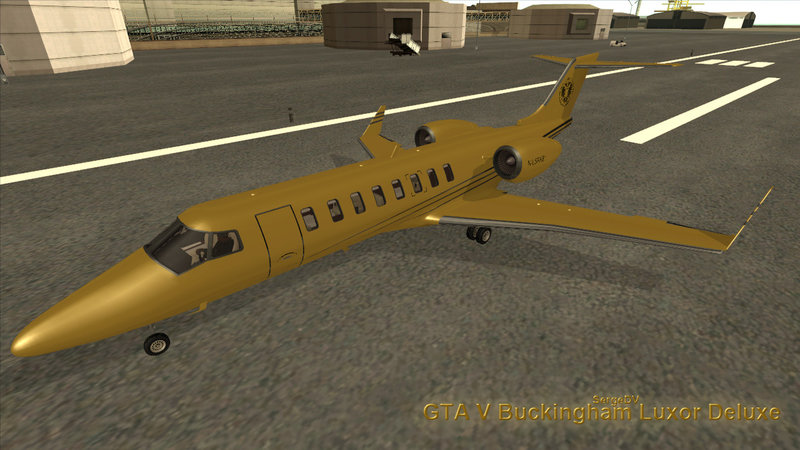
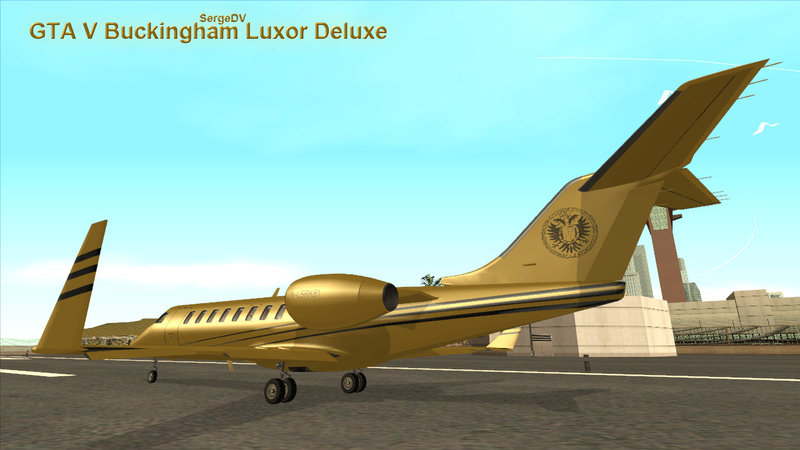
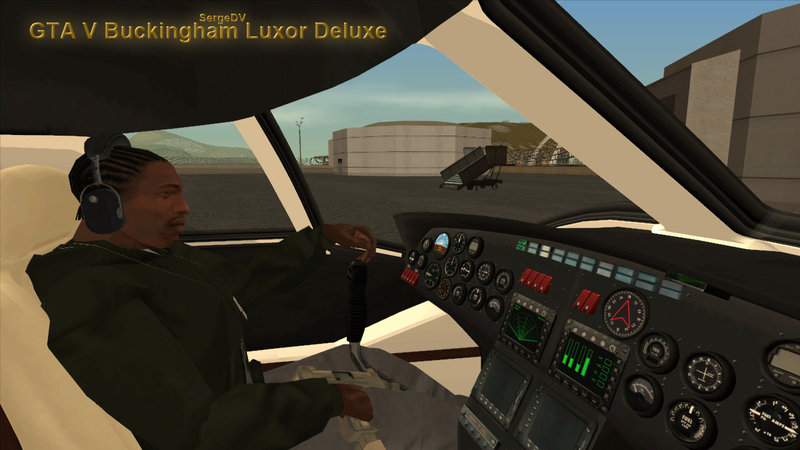
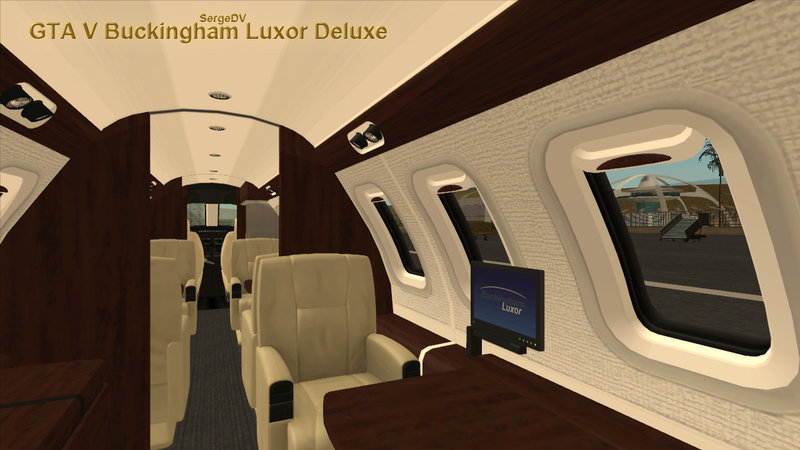
GTA V Buckingham Luxor Deluxe
- SergeDV | yükleyen: SergeDV
- 01/13/2016
- 37672 İndirmeler
Puanlamalar:
Lütfen önce giriş yap.
Favoriler:
Videos


Bu moda video eklemek için giriş yapmış olman gerekir.
Açıklama
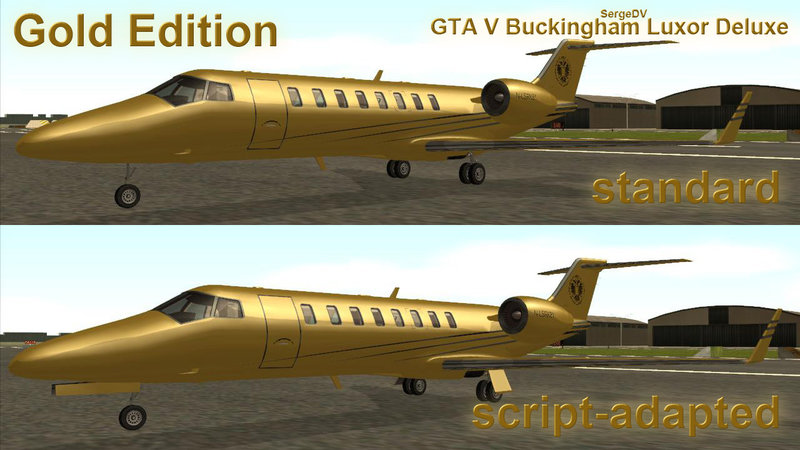
The Buckingham Luxor Deluxe is a luxurious variant of the Luxor added in the Ill-Gotten Gains Part 1
- Replaces Shamal
- Custom Collision and Shadow
Full archive - 4 versions:
- standard gold
- script-adapted (active landing gears, gear doors, back propellers)
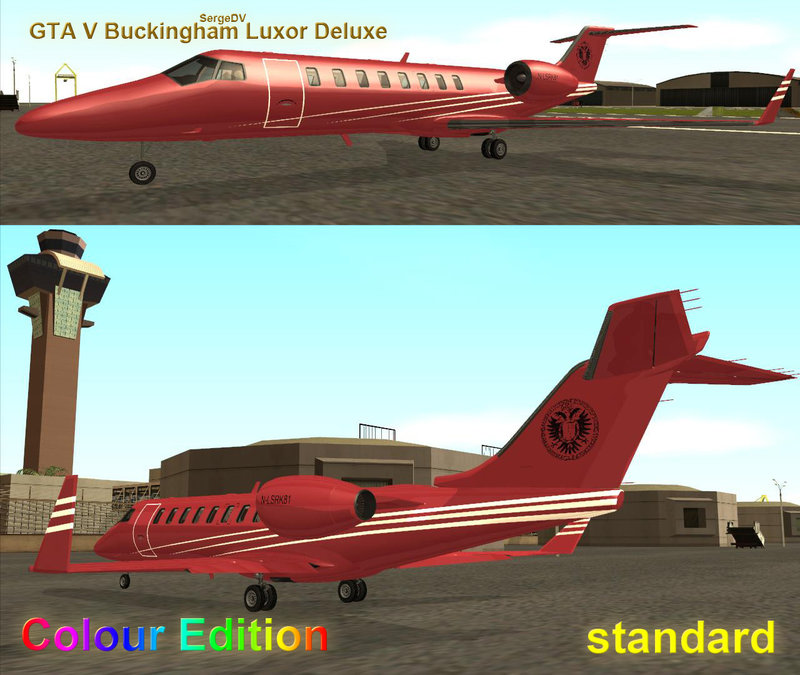
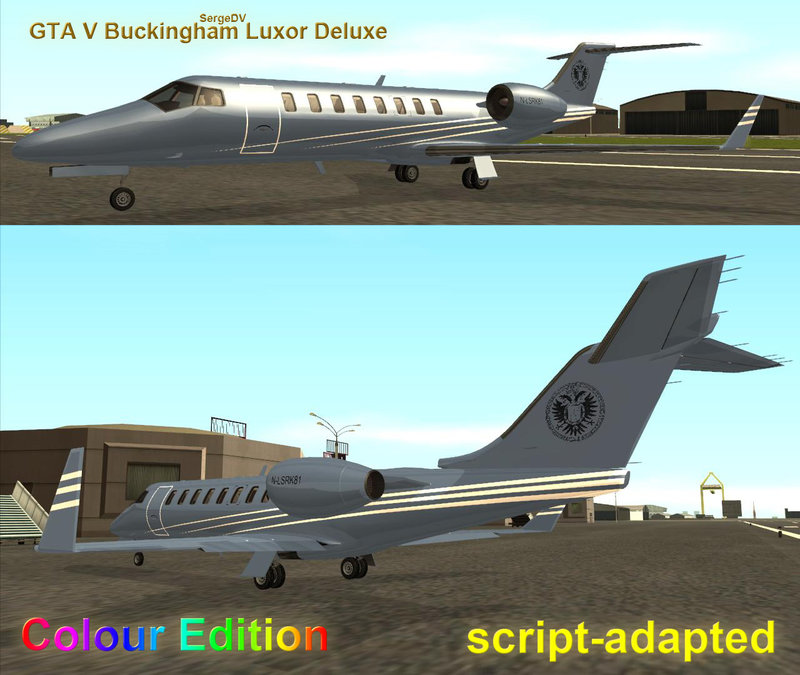
- standard two-colour
- two-colour, script-adapted
- Replaces Shamal
- Custom Collision and Shadow
Full archive - 4 versions:
- standard gold
- script-adapted (active landing gears, gear doors, back propellers)
- standard two-colour
- two-colour, script-adapted
Yorumlar
Şu ana kadar 40 yorum gönderilmiş.

01/15/2022 08:05
@SergeDV As per your instructions, I unlocked this model using rw analyzer. but after editing (I only changed the pilot seat to passenger seat) and exporting to dff, the textures are messed up . the textures are not getting applied to the model in zmodeler
Alıntı yap | Cevapla
@SergeDV As per your instructions, I unlocked this model using rw analyzer. but after editing (I only changed the pilot seat to passenger seat) and exporting to dff, the textures are messed up . the textures are not getting applied to the model in zmodeler
Alıntı yap | Cevapla
03/13/2021 14:43
@GTA61
Usually new IDs don't support sounds of reactive planes: shamal, hydra, at400, androm. But use the last version of Fastman92 Limit Adjuster. It must support the reactive sounds. It has tutorials. I don't test it yet.
You need to change ID of the plane in the CLEO script. Change all the text "#SHAMAL" to your ID, for example "614". Edit and compilate by Sanny Builder 3.
About opening door. Maybe it needs to rotate the door pivot in the model by 3d editor if the last version of Fastman92 Limit Adjuster doesn't fix it. Models often work wrong in new IDs in GTA SA.
The tutor by Junior_Djjr
https://www.mixmods.com.br/2015/12/tutorial-adicionar-carros-sem-substituir.html
Alıntı yap | Cevapla
@GTA61
Usually new IDs don't support sounds of reactive planes: shamal, hydra, at400, androm. But use the last version of Fastman92 Limit Adjuster. It must support the reactive sounds. It has tutorials. I don't test it yet.
You need to change ID of the plane in the CLEO script. Change all the text "#SHAMAL" to your ID, for example "614". Edit and compilate by Sanny Builder 3.
About opening door. Maybe it needs to rotate the door pivot in the model by 3d editor if the last version of Fastman92 Limit Adjuster doesn't fix it. Models often work wrong in new IDs in GTA SA.
The tutor by Junior_Djjr
https://www.mixmods.com.br/2015/12/tutorial-adicionar-carros-sem-substituir.html
Alıntı yap | Cevapla

03/13/2021 13:24
@SergeDV how to add this (not replace)...i tried using shamal lines.. it appears but no sound of engines..but i can hear only radio.and landing gears are not folding. door opens like a car.please give any link of tutorial to add planes..
Alıntı yap | Cevapla
@SergeDV how to add this (not replace)...i tried using shamal lines.. it appears but no sound of engines..but i can hear only radio.and landing gears are not folding. door opens like a car.please give any link of tutorial to add planes..
Alıntı yap | Cevapla



04/16/2017 23:16
@SergeDV Aww I see, it's a very nice mod nontheless Keep up the good work!
Alıntı yap | Cevapla
@SergeDV Aww I see, it's a very nice mod nontheless
Keep up the good work!Alıntı yap | Cevapla
04/16/2017 16:57
@DarkLogo
No, it isn't. The plane was needed a good collision so CJ can't walk inside.
Alıntı yap | Cevapla
@DarkLogo
No, it isn't. The plane was needed a good collision so CJ can't walk inside.
Alıntı yap | Cevapla
12/30/2016 13:20
@RIZKY GAME
Download 3ds Max with Google search. Find torrent link.
Alıntı yap | Cevapla
@RIZKY GAME
Download 3ds Max with Google search. Find torrent link.
Alıntı yap | Cevapla

10/16/2016 09:19

Alıntı yap | Cevapla
Thank You For Your InformationQuote: SergeDV
@RIZKY GAME
I don't lock my models.
3ds max must import the DFFs without problem (model was made with 3ds max).
Change DFF version with RW Analyze if you can't import to ZModeler. Version 3.4 or 3.5.
Open RW.
Tools - Commands - Convert DFF to RW 3.4 - Current File (Ctrl + D), OK and File - Save (Ctrl + S).
or
Tools - Commands - Change File Version - RW 3.5 (0x1400FFFF), OK and File - Save (Ctrl + S).
see pictures from RW
http://imgur.com/a/VqXCc
Alıntı yap | Cevapla
10/16/2016 08:58
@RIZKY GAME
I don't lock my models.
3ds max must import the DFFs without problem (model was made with 3ds max).
Change DFF version with RW Analyze if you can't import to ZModeler. Version 3.4 or 3.5.
Open RW.
Tools - Commands - Convert DFF to RW 3.4 - Current File (Ctrl + D), OK and File - Save (Ctrl + S).
or
Tools - Commands - Change File Version - RW 3.5 (0x1400FFFF), OK and File - Save (Ctrl + S).
see pictures from RW
http://imgur.com/a/VqXCc
Alıntı yap | Cevapla
@RIZKY GAME
I don't lock my models.
3ds max must import the DFFs without problem (model was made with 3ds max).
Change DFF version with RW Analyze if you can't import to ZModeler. Version 3.4 or 3.5.
Open RW.
Tools - Commands - Convert DFF to RW 3.4 - Current File (Ctrl + D), OK and File - Save (Ctrl + S).
or
Tools - Commands - Change File Version - RW 3.5 (0x1400FFFF), OK and File - Save (Ctrl + S).
see pictures from RW
http://imgur.com/a/VqXCc
Alıntı yap | Cevapla


02/18/2016 02:36
@The Gta Game R
No. It is small cabin height for CJ's collision.
Alıntı yap | Cevapla
@The Gta Game R
No. It is small cabin height for CJ's collision.
Alıntı yap | Cevapla



01/17/2016 19:52
Update! Ready
- 4 versions of model: standard and script, gold and colour
- rotating propellers of engines
- turning left-right front wheel
- wheels can move up-down (suspension)
- better collision
Alıntı yap | Cevapla
Update! Ready
- 4 versions of model: standard and script, gold and colour
- rotating propellers of engines
- turning left-right front wheel
- wheels can move up-down (suspension)
- better collision
Alıntı yap | Cevapla
01/16/2016 17:57
Another script. I dont khow who is author of that script.
But plane is adapted to script today (landing gears, gear doors) - small change http://i.imgur.com/EAX79hE.jpg
Al_planes.cs is difficult for me.
When I will know the autor I'll reload mod archive with 2 versions
Alıntı yap | Cevapla
Quote: pie314159
Good job
Will this airplane supports with ai_planes.cs?
Another script. I dont khow who is author of that script.
But plane is adapted to script today (landing gears, gear doors) - small change http://i.imgur.com/EAX79hE.jpg
Al_planes.cs is difficult for me.
When I will know the autor I'll reload mod archive with 2 versions
Alıntı yap | Cevapla

01/15/2016 15:15
@SergeDVAlright :) Will wait for the next update mate thanks :)
Alıntı yap | Cevapla
@SergeDVAlright :) Will wait for the next update mate thanks :)
Alıntı yap | Cevapla
01/14/2016 18:05
landing lights dont work on aircraft
I specially did unmoved wheels (attached to gears) in order to get rid of their "up-down" moving. Unlikely Ill fix that. im sorry
Alıntı yap | Cevapla
Quote: Aaron Hossain
With the landing gear ..some color textures , Is it possible to add a landing light?? at the front?? and the nose wheel doesn't move at right/left can you fix that
landing lights dont work on aircraft
I specially did unmoved wheels (attached to gears) in order to get rid of their "up-down" moving. Unlikely Ill fix that. im sorry
Alıntı yap | Cevapla
01/14/2016 17:38
With the landing gear ..some color textures , Is it possible to add a landing light?? at the front?? and the nose wheel doesn't move at right/left can you fix that
Alıntı yap | Cevapla
Quote: SergeDVQuote: Aaron Hossain
Perfect but not perfect lol I loved it but still need some improvements
What improvements?
Quote: JWH37683
@SergeDV
But the mod's passenger jet is Boeing 747, not from GTA V.
Just remap texture use from GTA V.
Hope someone convert original GTA V passenger jet..
see sizes of aircraft fron GTA SA and GTA V
http://i.imgur.com/kcScciE.jpg
With the landing gear ..some color textures , Is it possible to add a landing light?? at the front?? and the nose wheel doesn't move at right/left can you fix that
Alıntı yap | Cevapla