GTA V / Arabalar / Dokular
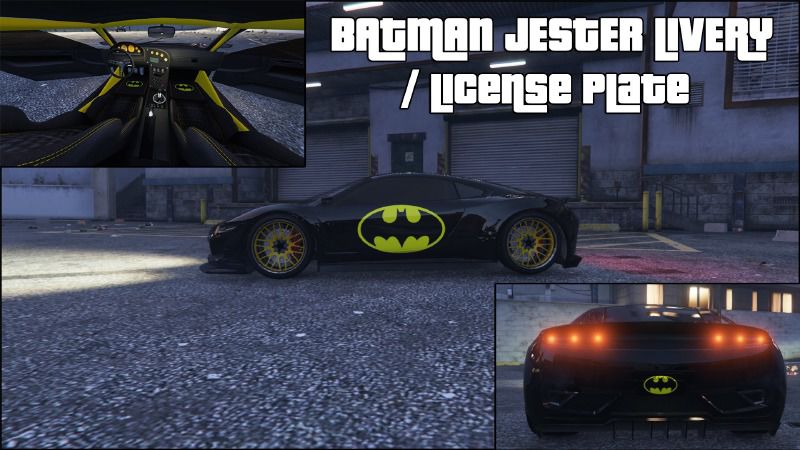
Batman Jester Livery / License Plate
- brandon4179 | yükleyen: runitsalpha
- 06/02/2015
- 2835 İndirmeler
Puanlamalar:
Lütfen önce giriş yap.
Favoriler:
Videos

Bu moda video eklemek için giriş yapmış olman gerekir.
Açıklama
VIDEO - https://youtu.be/IWq07FO1gcA
Car Installation:
1. Go into GTA V in OpenIV.
2. navigate to update\x64\dlcpacks\mpchristmas2\dlc.rpf\x64\levels\gta5\vehicles\xmas2vehicles.rpf. and make sure Edit Mode
is activated.
3. Then find jester2.ytd.
4. Make a backup copy (Extract it).
5. Replace it with jester2.ytd from the Batman Jester Folder.
License Plate Installation:
1. Go into GTA V in OpenIV.
2. navigate to GTA V\x64e.rpf\levels\gta5\vehicles.rpf. and make sure Edit Mode
is activated.
3. Find vehshare.ytd
4. Make a backup copy (Extract it).
5. Replace it with vehshare.ytd from the Batman License Plate folder.
6. Vist LS Customs and buy the Yellow on Black Plate.
This is not needed if you don't want to use it, the skin will work fine without the license plate.
I suggest downloading Customize Plate Mod and setting the license plate blank.
Download Link: https://www.gta5-mods.com/scripts/customize-plate
Don't go Online with this mod, you may get banned!
By: Brandon4179
Car Installation:
1. Go into GTA V in OpenIV.
2. navigate to update\x64\dlcpacks\mpchristmas2\dlc.rpf\x64\levels\gta5\vehicles\xmas2vehicles.rpf. and make sure Edit Mode
is activated.
3. Then find jester2.ytd.
4. Make a backup copy (Extract it).
5. Replace it with jester2.ytd from the Batman Jester Folder.
License Plate Installation:
1. Go into GTA V in OpenIV.
2. navigate to GTA V\x64e.rpf\levels\gta5\vehicles.rpf. and make sure Edit Mode
is activated.
3. Find vehshare.ytd
4. Make a backup copy (Extract it).
5. Replace it with vehshare.ytd from the Batman License Plate folder.
6. Vist LS Customs and buy the Yellow on Black Plate.
This is not needed if you don't want to use it, the skin will work fine without the license plate.
I suggest downloading Customize Plate Mod and setting the license plate blank.
Download Link: https://www.gta5-mods.com/scripts/customize-plate
Don't go Online with this mod, you may get banned!
By: Brandon4179
Yorumlar
Şu ana kadar 1 yorum gönderilmiş.